How to Use the Lane Departure Warning System (LDWS)
LDWS operates
The LDWS operates when all of the following conditions are met and the system determines that there is a possibility that your vehicle may deviate from its lane.
-
The vehicle speed is about 50 km/h (31 mph) or faster.
The system may operate at a vehicle speed of about 40 km/h (25 mph) or faster depending on the driver's condition.
-
The system detects white (yellow) lane lines.
While the LDWS is operating, the screen display, warning sound, and steering wheel vibration notify the driver.
Instrument cluster (i-ACTIVSENSE display)
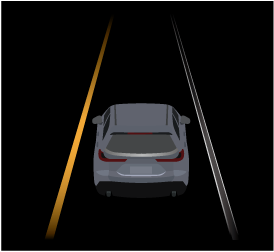
Instrument cluster (Other than i-ACTIVSENSE display)

Active driving display

The LDWS operates only on the side that detects white lines (yellow lines).
The forward camera may not be able to detect target objects correctly, and the LDWS may not operate normally.
Refer to Forward Camera (Search).
The LDWS warning type can be changed using Mazda Connect.
Tap  displayed on the navigation bar of the center display to set, or consult an Authorized Mazda Dealer.
However, the LDWS warning type is linked to the Emergency Lane Keeping Assist (ELK) warning type. If the LDWS warning type is changed, the ELK warning type is also changed.
If it is determined that the driver has intentionally departed from its lane, the LDWS may not operate.
The LDWS may operate earlier depending on the driver's condition.


LDWS is temporarily canceled
If any of the following conditions is met, the LDWS is canceled. In addition, the LDWS is automatically enabled when the condition changes and the system is operable.
-
The turn signal lever is operated.
-
The accelerator pedal is operated.
-
The steering wheel is operated.
-
The brake pedal is depressed.
-
The vehicle is driven on roads with narrow lanes.
-
The vehicle is making a sharp turn.
-
The TCS/DSC is turned off.
-
The Smart Brake Support (SBS) is operated.
Turning off the warning sound
There are 2 ways to turn off the warning sound while the LDWS is operating.
-
Turn off the warning sound using Mazda Connect.
Tap
displayed on the navigation bar of the center display to set, or consult an Authorized Mazda Dealer. -
Turn off the warning sound using the i-ACTIVSENSE mute switch.
Refer to How to Use the i-ACTIVSENSE mute switch (Search).
Turning off the LDWS
The LDWS can be turned off using the Mazda Connect.
Tap displayed on the navigation bar of the center display to set, or consult an Authorized Mazda Dealer.
When the LDWS is turned off, the LAS & LDWS OFF indicator  turns on.