How to Use the Shift Selector
Operating the Shift selector
-
Start the engine.
-
Operate the shift selector.
|
Shift selector operation |
Operation condition |
|---|---|
|
Shift from P position to R position |
Depress the brake pedal and press the shift selector button to operate. |
|
Shift from R position to N position |
Shift the lever without pressing the shift selector button. |
|
Shift from N position to D position |
|
|
Shift from D position to N position |
|
|
Shift from N position to R position |
Press the shift selector button to shift the lever. |
|
Shift from R position to P position |
|
The shift indicator turns on at the same position as the shift position displayed in the instrument cluster.
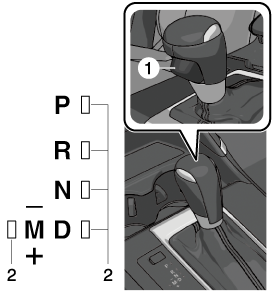
1 Shift Selector button
2 Shift indicator
The shift position is displayed in the instrument cluster.

Shift position restrictions
The shift position changes to the N position for safety when the following operations are performed.
Once action is taken, the shift selector position and the shift position become the same.
|
Operation/driving conditions |
Action |
|---|---|
|
When the brake pedal is not depressed or the accelerator pedal is depressed while the vehicle is stopped, the shift selector is shifted from the N position to the R or D position.1 |
Release your foot from the accelerator pedal and depress the brake pedal. |
|
When the vehicle speed is 5 km/h (3 mph) or faster, the shift selector is shifted from the R or D position to the P position. |
(Action 1) Reduce the vehicle speed to less than 5 km/h (3 mph). (Action 2) Shift the shift selector to the prior operation position (R or D position). |
|
When the vehicle speed is 10 km/h (6.2 mph) faster, the shift selector is shifted from the R position to the D position, or from the D position to the R position. |
(Action 1) Reduce the vehicle speed to less than 10 km/h (6.2 mph). (Action 2) Shift the shift selector to the prior operation position (R or D position). |
1 The parking brake is applied automatically.
Shift guide indication
In the following cases, the shift position is displayed in the instrument cluster even if the Push button start is in a position other than ON.
-
The AUTO P (parking lock) function is operating.
-
Neutral hold mode is operating.
When the shift position and the shift selector position differ, the shift position and the shift selector position are displayed.

1 Shift selector position
2 Shift position
If the shift selector cannot be shifted from the P position, the lead-acid battery could be depleted.
When the shift selector is shifted from the N position to the D/R position without depressing the brake pedal, the shift position and the shift selector position differ, however, the shift guide indication is not displayed.
When the Push button start is switched from ON to ACC or OFF, the shift guide indication displayed after operating the AUTO P (parking lock) function turns on for a certain period of time and then it turns off.


Operating the AUTO P (Parking Lock) Function
Meet the following conditions while the vehicle is stopped.
-
Switch the Push button start from ON to OFF.
-
Unfasten the driver's seat belt and open the driver's door while the shift position is in the D/R position.
Unfasten the driver's seat belt and open the driver's door while the shift position is in the D/R position.
When the AUTO P (parking lock) function operates, only the transmission shift position changes to the P position automatically. The shift position indication in the instrument cluster will differ from the shift selector position because the shift selector position does not change. Check the shift position indication in the instrument cluster and shift the shift selector to the P position.