How to Use the Rear View Monitor
Displaying the rear view monitor
Shift the shift selector to the R position.
Images are displayed on the center display.
Switching the image
You can change the image displayed on the center display by tapping each icon.
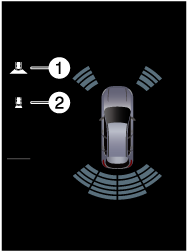
1 Rear wide view
2 Rear view
Displaying the Trailer Hitch Guideline
Tap  on the center display.
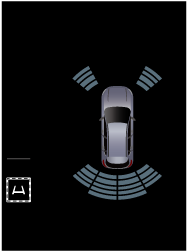
changes to  and the Trailer Hitch Guideline is displayed.
The Trailer Hitch Guideline can be displayed when a Mazda genuine trailer hitch is connected.
/ is displayed in the following cases.
-
The shift selector is in the R position.
-
The rear view or rear wide view is displayed.
The display of the Trailer Hitch Guideline may not be able to switch in the following cases.
-
Directly after switching the vehicle power ON.
-
The vehicle speed is 20 km/h (12 mph) or faster.
The display of the Trailer Hitch Guideline is not linked to the Driver Personalization System.


Turning off the Rear Cross Traffic Alert (RCTA), rear pedestrian alert, and parking sensor warning sounds
Tap  on the center display.
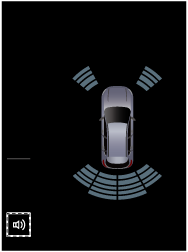
changes to  and the RCTA, rear pedestrian alert, and parking sensor warning sounds are temporarily turned off.
If an obstruction is detected and a warning sound is activated, / is displayed.
The warning sound may not be able to be turned off in the following cases.
-
Directly after switching the vehicle power ON.
-
The vehicle speed is 20 km/h (12 mph) or faster.
Viewing the screen
The images displayed on the center display are reversed left and right.
The Trailer Hitch Guideline may appear off-center in the video image.
When any of the following conditions is met, the hitch ball or the trailer coupling may appear deviated from the Trailer Hitch Guideline.
-
A vehicle condition has changed (such as weight, tire pressure).
-
The luggage compartment is not fully closed.
-
The road surface is not flat.
-
There is a large difference in height between the hitch ball and the trailer coupling.
-
The hitch ball position deviates from normal conditions.
The RCTA and rear pedestrian alert indications may not match the movement of the target object or may not be displayed at all depending on the surrounding conditions.
The RCTA, and rear pedestrian alert displays are superimposed on the camera image and may be difficult to see due to the surrounding brightness and color.
When the rear view monitor is displayed with the liftgate open,  is displayed on the center display.
When tapping  on the center display while the rear view monitor is displayed, the brightness and contrast of the rear view monitor can be changed.
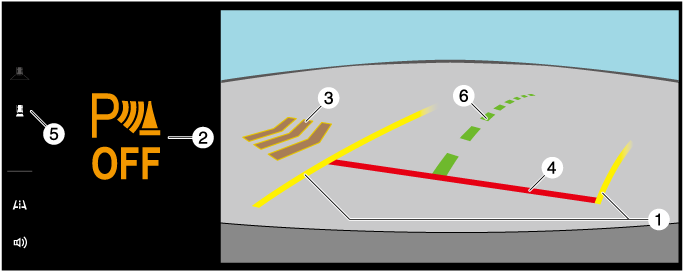
Rear view
When the parking sensor is ON
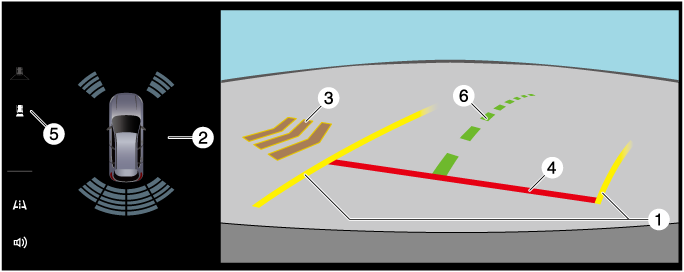
When the parking sensor is OFF
|
|
Indication |
Content |
|---|---|---|
|
1 |
Projected vehicle path lines (yellow) |
Indicates the approximate projected path of the vehicle. Moves in conjunction with the steering wheel operation. |
|
2 |
Parking sensor detection indication |
Indicates the detection condition of the parking sensor. It will be hidden when the parking sensor does not detect an obstacle. If the parking sensor is off or has a malfunction, |
|
3 |
RCTA, rear pedestrian alert detection indication |
Indicates the detection condition of the RCTA, rear pedestrian alert. |
|
4 |
Distance guide lines (red) |
Indicates approximately 50 cm ahead from the rear end of the rear bumper (when driving straight). |
|
5 |
View status icon |
Indicates which image is selected. |
|
6 |
Trailer Hitch Guideline |
Indicates the approximate position of the hitch ball. Moves in conjunction with the steering wheel operation. |
 is displayed.
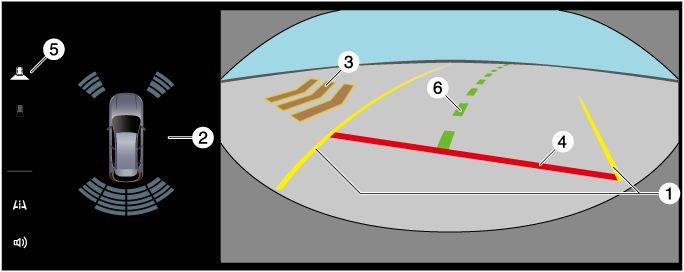
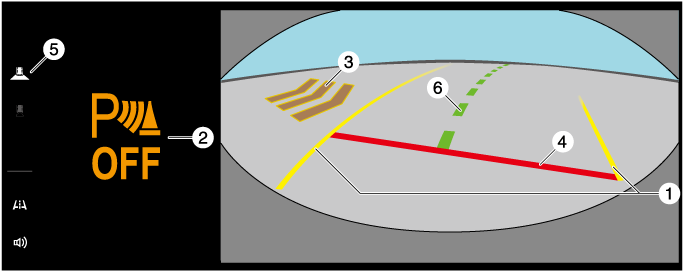
Rear wide view
When the parking sensor is ON
When the parking sensor is OFF
|
|
Indication |
Content |
|---|---|---|
|
1 |
Projected vehicle path lines (yellow) |
Indicates the approximate projected path of the vehicle. Moves in conjunction with the steering wheel operation. |
|
2 |
Parking sensor detection indication |
Indicates the detection condition of the parking sensor. It will be hidden when the parking sensor does not detect an obstacle. If the parking sensor is off or has a malfunction, |
|
3 |
RCTA, rear pedestrian alert detection indication |
Indicates the detection condition of the RCTA, rear pedestrian alert. |
|
4 |
Distance guide lines (red) |
Indicates approximately 50 cm ahead from the rear end of the rear bumper (when driving straight). |
|
5 |
View status icon |
Indicates which image is selected. |
|
6 |
Trailer Hitch Guideline |
Indicates the approximate position of the hitch ball. Moves in conjunction with the steering wheel operation. |
System problem indication
In the following cases, there might be a problem with the system. Have the vehicle inspected by an Authorized Mazda Dealer.
-
“No camera signal.” is displayed on the center display.
-
The display on the center display does not switch to the camera image even if the shift selector is shifted to the R position.
-
The camera image on the center display remains displayed even if the shift selector is shifted to a position other than R.
-
A portion or all of the display on the center display is black.
-
The guide lines or icons are not displayed on the center display and
is displayed. -
The i-ACTIVSENSE warning light
 in the instrument cluster is turned on.