How to Use the Cruise Control
Setting the cruise control
-
Press and hold
 on the steering switch.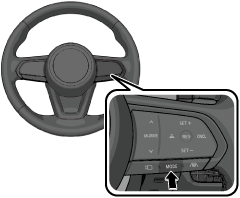
When the system is on, the cruise control standby indication (white)
 is displayed.
 -
Accelerate the vehicle to the desired speed of 25 km/h (16 mph) or faster (minimum speed setting is 30 km/h (19 mph)).
-
Press
 or
or  on the steering switch to set the speed.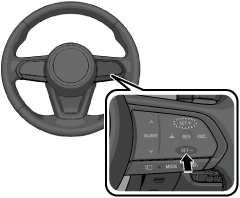
When the vehicle speed is set, the set vehicle speed is displayed on the displays and the cruise control standby indication (white)
changes to the cruise control set indication (green)  .
.
While the cruise control is operating, the driver is notified of the operation condition by the screen display.
Instrument cluster/Active driving display
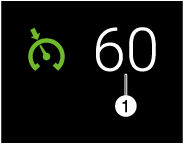
1 Set speed
From the cruise control standby condition, press and hold on the steering switch to switch to the MRCC standby condition.
The cruise control does not operate when the Hill Descent Control is operating.
The accelerator pedal operation takes priority during constant speed driving. When you release your foot from the accelerator pedal, the vehicle returns to constant speed driving at the set speed.
The system may not be able to maintain the set speed depending on the road conditions such as steep up or down slopes.
When the vehicle speed is less than 25 km/h (16 mph), the cruise control is canceled. If you want to use the cruise control again, reset the cruise control.
The brake lights turn on while the brakes are operating by the cruise control.
While driving the vehicle using cruise control, the cruise control will not be canceled and engine braking will not be applied even if the transmission is shifted down to a lower gear manually. If deceleration is required, lower the set vehicle speed or depress the brake pedal.


Changing the set vehicle speed
Changing the set vehicle speed using the steering switch
Operate or on the steering switch until the desired speed is reached.
-
Press and release immediately: 1 km/h (1 mph)
-
(Israel)
Press and hold/flick: 10 km/h (5 mph)
-
(Except Israel)
Press and hold: 10 km/h (5 mph)
The flick operation of the steering switch can be turned on using Mazda Connect.
Tap  displayed on the navigation bar of the center display to set, or consult an Authorized Mazda Dealer.
Changing the set vehicle speed using the accelerator pedal
Depress the accelerator pedal and press the (SET+ icon) up or (SET- icon) down at the desired speed.
The cruise control is temporarily canceled
The cruise control is temporarily canceled when one of the following conditions is met.
-
The brake pedal is depressed.
-
The CANCEL switch is pressed one time.
-
The DSC has operated.
-
The Smart Brake Support (SBS) has operated.
-
The frequency of the braking operation by the cruise control is high.
If the cruise control is temporarily canceled, the cruise control operates at the previously set speed by pressing  on the steering switch.
Turning off the cruise control
Press and hold on the steering switch to turn the cruise control off and switch to the MRCC standby condition.