Warnings and Cautions for Using the 360° View Monitor
Always confirm the safety of the area around the vehicle visually when driving.
When the vehicle is driven at low speeds, the 360° View Monitor is an auxiliary device which assists the driver in checking the safety of the area around the vehicle.
Do not rely completely on the 360° View Monitor.
-
The shooting range of the cameras and detection range of the sensors are limited. For example, the following locations displayed on the screen may be blind spots and target objects may not be visible.
-
Areas in black near your vehicle and on screen
-
Seams where each of camera images merge
-
-
Structures that are higher than the camera or on an incline may not be displayed on the screen or may differ from the actual conditions.
-
There are seams where the top view, see-through view, and 3D camera view images merge. Obstructions near the image seams may not be displayed accurately or clearly (they may be displayed as if they are tilted over, as if they are suddenly appearing near the seam, they may be displayed double, perceived distance may be different from actual one, or obstruction may not be displayed at all).
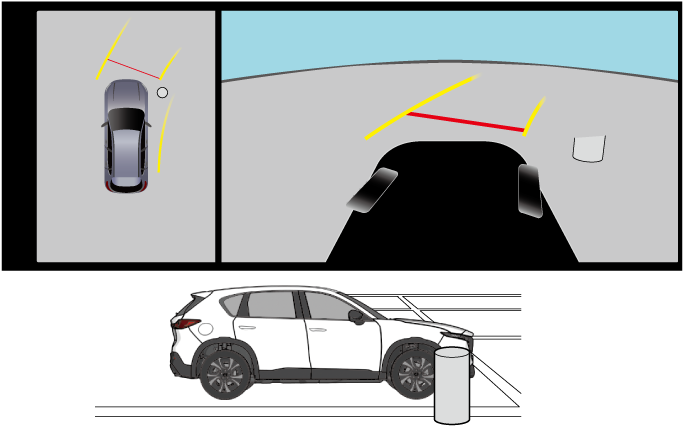
-
The seams where each of the camera images merge may not be aligned properly depending on the vehicle conditions and the surroundings.
-
Vehicle width extension lines and projected vehicle paths are only estimates. Images displayed on the display may differ from the actual conditions.
-
The vehicle outline and tire icons displayed in the underfloor see-through function are for reference only. Images displayed on the screen may differ from the actual conditions depending on the vehicle conditions.
-
Even if an obstruction is displayed in the front view, rear view, rear wide view, or side view, it may not be displayed in the top view, see-through view, or 3D camera view.
-
If the parking sensor is turned off, the obstruction detection indication does not display. For details, refer to the parking sensor entry.
Refer to Parking Sensor (Search).


Handle the cameras appropriately. If the cameras are handled incorrectly, images may not be displayed normally.
Refer to Surround Cameras (Search).
Do not use the 360° view monitor in the following locations or conditions.
-
Bumpy roads
-
The vehicle is on a road incline.
-
Icy or snow-covered roads
-
Tire chains or a temporary spare tire is installed.
-
Doors or the liftgate is not fully closed
Heed the following cautions to assure that the 360° view monitor operates normally.
-
Do not modify the suspensions.
-
Always use wheels of the specified size for the front and rear wheels. Consult an Authorized Mazda Dealer for tire replacement.
When the center display is cold or the ambient temperature is low, images may leave trails or the display might be darker than usual, making it difficult to check the vehicle surroundings. Always confirm the safety around the vehicle visually when driving.
Recognizing images at night may be difficult because there are no lights in the shooting range of the side camera. Always confirm the safety around the vehicle visually when driving.
The method for parking/stopping the vehicle using the 360° View Monitor differs depending on the road conditions and vehicle conditions. In addition, when and how much you turn the steering wheel will differ depending on the situation, therefore always check the vehicle surroundings directly with your eyes while using the system.