Operating Each Switch
AUTO icon
Automatically controlled according to the set temperature.

Temperature setting icon
How to increase the set temperature

How to decrease the set temperature

The set temperature can also be changed by tapping the temperature setting bar displayed by tapping the temperature setting icon or sliding the slider on the temperature setting bar.
The set temperature changes in increments of 0.5 °C within a range of 15 °C (60 °F) and 29 °C (84 °F).
The set temperature can be quickly adjusted by pressing and holding the temperature setting icon.
When the temperature is set to the lower or upper limit, “LO” or “HI” is displayed.


SYNC (synchronized temperature) icon
The mode switches between independent mode and interconnection mode each time the icon is tapped.

Independent mode (indicator light turned off)
The set temperature can be controlled independently for the driver's side and front passenger's side.
Tap the driver's side temperature setting icon or the front passenger's side temperature setting icon to control the temperature.
Interconnection mode (indicator light turned on)
The set temperature for the driver's side and front passenger's side is controlled simultaneously.
Tap the driver's side temperature setting icon to control the temperature.
The set temperature for the front passenger's side changes to that of the driver when independent mode is switched to interconnection mode.
When the front passenger's side temperature setting icon is touched while in interconnection mode (the indicator light turned on), the mode switches to independent mode (the indicator light turned off).
A/C icon
The cooling/dehumidifying function switches between on and off each time the icon is tapped. The indicator light turns on while the function is operating.

The air conditioner may not operate when the ambient temperature falls to nearly 0 °C (32 °F) to protect the system.
Rear window defogger switch
Use to defog the rear window.
Refer to How to Use the Rear Window Defogger Switch (Search).
Air intake selector icon
The mode is switched between recirculate mode and fresh air mode each time the icon is tapped.
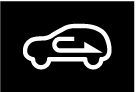
Do not recirculate the air in the cabin during cold or rainy weather.
Recirculating the air in the cabin during cold and rainy weather is dangerous as it will cause the windows to fog up. Your vision will be hampered, which could lead to a serious accident.
Recirculate mode (Indicator light turns on)
Outside air is shut off. Air within the vehicle is recirculated. Use this mode when going through tunnels, driving in congested traffic (high engine exhaust areas), or when quick cooling is desired.
Fresh air mode (Indicator light turns off)
Outside air is allowed to enter the cabin. Use this mode for ventilation or windshield defrosting.
The recirculate mode is the default mode whenever the vehicle power is switched ON, the climate control system is on, and the outside temperature exceeds about 23 °C (73 °F).
To exit the default recirculate mode, press the air intake selector switch to select the fresh air mode.
When the air intake selector switch is set to the fresh air mode and the outside temperature exceeds about 23 °C (73 °F), the climate control system may automatically select the recirculate mode to improve the efficiency of the climate control system.
Mode selector icon
The desired airflow mode can be selected.

In the  or
or  mode, the air conditioner is automatically turned on and the fresh air mode is automatically selected to defrost the windshield. In the or mode, the fresh air mode cannot be changed to the recirculate mode.
Fan control icon
The airflow amount adjustment bar is displayed and the airflow amount can be adjusted.

How to increase the airflow amount
-
Tap the fan control icon.
-
Tap “+”.
How to decrease the airflow amount
-
Tap the fan control icon.
-
Tap “-”.
The airflow amount changes each time the icon is pressed.
The currently set airflow amount is displayed on the right side of the fan icon.
The airflow amount can be adjusted to 7 levels.
The airflow amount can also be changed by tapping the airflow amount adjustment bar displayed by tapping the fan icon or sliding the slider on the airflow amount adjustment bar (you can operate without lifting your finger after tapping the fan icon).
The airflow amount in auto mode can be set in Mazda Connect. Set using  displayed on the navigation bar of the center display to set, or consult an Authorized Mazda Dealer.
Climate control system power icon (system on/off)
Displayed by tapping the fan icon while the climate control system is operating. Tap to turn off the climate control system.

Windshield defroster switch/icon
Switches the windshield defroster on (indicator light turned on) and off (indicator light turned off).
Use to defrost the windshield and side windows.
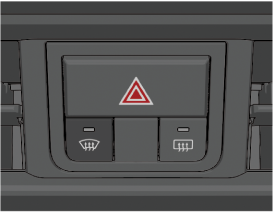
The windshield defroster can also be operated by tapping .
In this mode, the fresh air mode is automatically selected, and the air conditioner automatically turns on. The air intake selector cannot be changed to the recirculate mode. The air conditioner will directly dehumidify the air to the front windshield and side windows. Airflow amount will be increased.
Do not lower the airflow temperature when defrosting the windshield.
Otherwise, the outer side of the windshield will frost causing reduced visibility which may lead to an accident.
For faster defrosting, do any of the following operations.
-
Operate the fan control icon and increase the airflow amount.
-
Press the temperature setting icon to increase the airflow temperature.
Be careful that the windows do not fog up when doing any of the following operations.
-
Switch to recirculate mode.
-
Turn off the air conditioner.
Climate control system setting icon
Displays the climate control system setting screen.

The following functions can be set on the climate control system setting screen.
-
Rear window defogger
-
Occupant Comfort
-
Airflow amount while auto mode is operating