How to Use the Power Switch
The power switch starts/stops the hybrid system and switches the vehicle power position depending on the vehicle status and the driver's operation.
Starting the Hybrid system
-
Make sure that the parking brake is applied.
-
Make sure that the selector lever is in the P position.
-
Depress the brake pedal.
The power switch indicator light (green) and the KEY indicator light (green)
 in the instrument cluster turn on.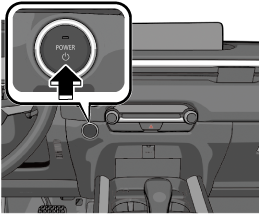
The hybrid system starts and the KEY indicator light (green)
in the instrument cluster turns off.The READY indicator light
 in the instrument cluster turns on.
-
If the hybrid system cannot start using the push button start, make sure that the power saving function of the key is not on. When the power saving function is on, the key operation indicator light does not turn on or flash. When the power saving function is on, turn it off.
Refer to Convenient Ways to Use the Key (Search).
-
Do not use high hybrid system speeds until reaching the operating temperature.


Stopping The Hybrid system
-
Stop the vehicle.
-
Shift the selector lever to the P position.
-
Set the parking brake.
The hybrid system stops and the vehicle power is switched OFF.
The READY indicator light
in the instrument cluster turns off.
Switching the Vehicle power Position
Press the power switch without depressing the brake pedal.
Each time the power switch is pressed, the vehicle power position is switched in the order of ACC, ON, and OFF.
When the vehicle power is switched to ACC, the power switch indicator light (amber) turns on.
When the vehicle power is switched OFF and a door is opened/closed or locked, the power switch indicator light (amber) turns off.
If you leave the vehicle power switched to ACC while the selector lever is in the P position, the vehicle power is switched OFF in about 25 minutes.