

Communication Settings
-
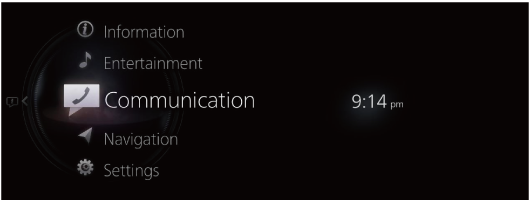
Select “Communication” on the home screen.
-
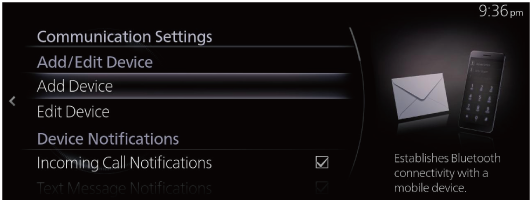
When “Communication Settings” is selected, the settings list is displayed. Select the menu you want to change from the settings list and change the setting.
|
Menu |
Explanation |
|
|---|---|---|
|
Add/Edit Device |
Add Device |
Performs the Bluetooth® device’s connection settings. Refer to Connectivity Settings (Search). |
|
Edit Device |
You can change the connected Bluetooth® device. Refer to Connectivity Settings (Search). |
|
|
Device Notifications |
Incoming Call Notifications |
By changing the check status, you can set the notification on/off for when a call is received. |
|
Text Message Notifications (Some Models) |
By changing the check status, you can set the notification on/off for when a new message is received. |
|
|
Phone Sync Notification |
By changing the check status, you can set the notification on/off for when the synchronization with a Bluetooth® device is completed. |
|
|
Synchronization Settings |
Message Sync (Some Models) |
When checked to turn the function on, SMS messages are downloaded automatically when your Bluetooth® device is connected. |
|
Contacts and Call History Sync |
When checked to turn the function on, the phonebook and call history are downloaded automatically when your Bluetooth® device is connected. |
|
|
Communication Audio Settings |
Ringer*1 |
Changes the type of ring tone. Vehicle: Standard ring tone set on the vehicle Phone: Ring tone set on the Bluetooth® device |
|
Ringer Volume |
Adjusts the ring tone volume. |
|
|
Message Notification Volume (Some Models) |
Adjusts the volume of the message received notification. |
|
|
Automatically Read Selected Messages (Some Models) |
When checked to turn the function on, received messages are read out automatically. |
|
|
Text Message Playback Vol. (Some Models) |
Adjusts the volume the message read out. |
|
|
Other Settings |
Display Contact Images |
When checked to turn the function on, an image is displayed for the contact. |
|
Contacts Display Order |
The display order of the contacts can be changed. First, Last: Displays in the order of first name, last name. Last, First: Displays in the order of last name, first name. |
|
|
Preset Text Messages (Some Models) |
Edits the preset message Refer to Receiving and replying to messages (Search). |
|
|
Signature (Some Models) |
When checked to turn the function on, a signature is added when sending a message. |
|
|
Emergency Assistance Call (Some Models) |
Automatic 911 dialing can be set to enabled/disabled by changing the check status. |
|
-
Depending on the connected Bluetooth® device, it may not be possible to select “Phone”.
