

Bluetooth® Hands-Free
When connecting a Bluetooth® device (mobile phone) to the vehicle’s Bluetooth® unit via radio wave transmission, calls can be made or received.
-
Park the vehicle in a safe place and perform pairing.
-
The communication range of a Bluetooth® device is about 10 meters or shorter.
-
Some Bluetooth® mobile devices are not compatible with the vehicle. Consult an expert repairer (we recommend an Authorized Mazda Repairer), Mazda's call center or Web support center for information regarding Bluetooth® mobile device compatibility:
-
Website: https://connect.mazda.com/en/
-
U.S.A.
Phone: 800-430-0153
-
Canada
Phone: 800-430-0153
-
Mexico
Center of Attention to Client (CAC)
Phone: 01-800-01-MAZDA
-
Australia
-
New Zealand
-
Germany
Phone: 0800 4263 738 (8:00―18:00 Central European Time)
-
Europe (Except Germany)
Phone: 00800 4263 7383 (8:00―18:00 Central European Time)
-
Worldwide
Phone:
 49 721 5099 8198 (8:00―18:00 Central European Time)
-


Supported Bluetooth® standard (recommended)
Ver. 1.1/1.2/2.0 + EDR/2.1 + EDR/3.0 (conformity)
and devices that are compatible with Bluetooth® Ver. 4.2.
Component Parts
Center display
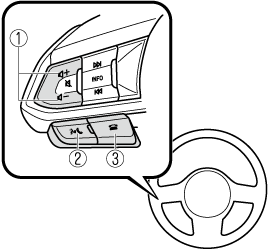
Volume adjustment button
-
Volume adjustment button
-
Talk/pick-up button
-
Hang-up button
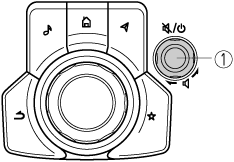
Commander switch (Type A)
-
Volume knob
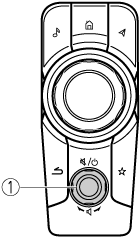
Commander switch (Type B)
-
Volume knob
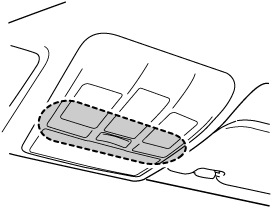
Microphone*1
-
In some models, a microphone may be installed near the center display.
The display and the shape of each switch may differ depending on the vehicle model.
Volume adjustment button
Adjusts the voice guidance and conversation volume.
Talk/pick-up button
Activates the voice recognition, skips the voice guidance.
In addition, when you press the button while on an incoming call, you can answer the call.
Hang-up button
Ends the call or refuses an incoming call.
In addition, it ends the voice recognition operation.
Volume knob
Adjusts the voice guidance and conversation volume the same as the volume adjustment button on the audio remote control switch. The volume increases by turning the dial clockwise, and decreases by turning it counterclockwise.
Microphone (hands-free)
The microphone is used for inputting a voice command using voice recognition or when making a hands-free call.
The Bluetooth® Call Volume is independent of the Bluetooth® Audio volume, which is also independent of the AM/FM/USB audio volume. Ensure that the Bluetooth® device volume is set at a reasonable level, and then adjust the call volume using the Mazda Connect volume knob.
