

Fuel Efficiency Monitor
The fuel efficiency monitor switches between the fuel efficiency history, energy flow monitor (if equipped) , and settings. They can be displayed by selecting each item on the center display.
-
Select “Information” on the home screen.
-
Select “Fuel Efficiency Monitor”.
-
Press the commander switch to display the menu.
-
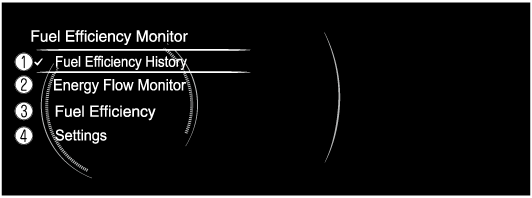
Select the item in the menu. Each item operates as follows:
-
Fuel Efficiency History (Some Models)
Displays the information regarding the fuel efficiency.
-
Energy Flow Monitor (Some Models)
Displays the system operation status.
-
Fuel Efficiency (Some Models)
Displays the actual energy efficiency.
-
Settings
Displays the settings for the fuel efficiency monitor.
Fuel Efficiency History (Some Models)
Displays the information regarding the fuel efficiency.

-
Fuel Efficiency: Current Drive
Displays the fuel efficiency for the past 60 minutes.
-
Displays the fuel efficiency every minute for the past 1 to 10 minutes.
-
Displays the fuel efficiency every 10 minutes for the past 10 to 60 minutes.
-
-
Average Fuel Efficiency History
Displays the average fuel efficiency over the past 5 resets and after the current reset.
-
Avg. Fuel Efficiency: Current Drive
Calculates the average fuel efficiency at regular intervals after vehicle travel starts, and displays it.
Energy Flow Monitor (Some Models)
With M Hybrid
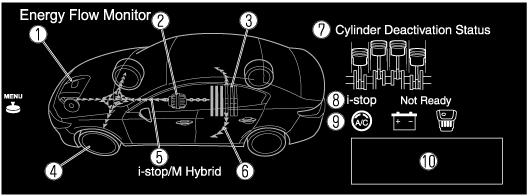
Displays the i-stop operation status, operation status of the cylinder deactivation function, and the M Hybrid operation and energy generating status.
Displays the energy flow by the direction of the arrows and movement of the arrows.
If there is no energy flow, the arrows are not displayed.
-
Engine
-
Integrated Starter-Generator (ISG)
-
M Hybrid battery
-
Tires
-
Arrows indicating energy flow
-
The arrow moves from the M Hybrid battery towards the electrical devices, and the vehicle indication is illuminated at the same time.
All the arrows are indicated, however the actual indication differs.
(Example)
-
When the M Hybrid battery is charging, the arrow moves towards M Hybrid battery.
-
While driving, the arrows move towards the tires from the engine (both the engine and ISG, depending on the driving conditions). In addition, the arrow moves from the M Hybrid battery towards the electrical devices, and the vehicle indication is illuminated at the same time.*1
-
The tire indications rotate while driving.
-
The remaining amount of power in the M Hybrid battery is indicated at 6 levels.
-
Charging of the M Hybrid battery is controlled automatically by M Hybrid. The remaining power in the M Hybrid battery may not reach the maximum even though power is regenerated by the engine power and deceleration regeneration. However, this does not indicate a problem.
-
-
The condition of each cylinder is displayed by colors. The operating cylinders are displayed in red. (Some Models)
-
Displays the readiness status as to whether operation of the i-stop function is available.
-
Displays the operation readiness status of the i-stop function using icons (engine, battery, and air conditioner). Icons which indicate that a system's operation readiness has been completed are illuminated. Icons which have not been illuminated indicate that the system's operation readiness has not been completed.
-
Indicates the operations required by the driver to operate the i-stop function while it is not operating.
-
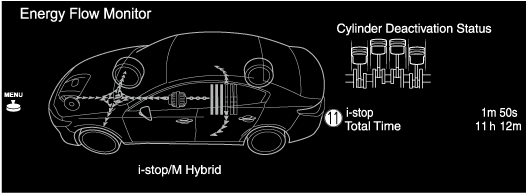
Displays the current amount of time that the i-stop function has been operating and the accumulated amount of time that it has been operating.


-
The indication may differ depending on the driving conditions.
Without M Hybrid
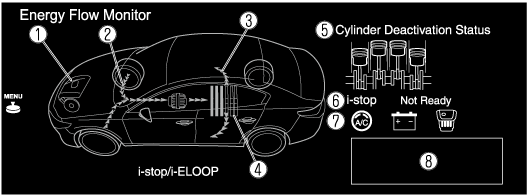
The i-stop operation status, cylinder deactivation operation status, and the i-ELOOP power generating status are displayed.
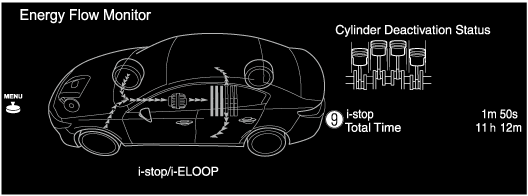
-
Displays the operation status of the i-stop function in the engine area. The engine area is illuminated while the engine idling stop is not operating, and it is not illuminated while the engine idling stop is operating.
-
Displays the level of electricity generated by regenerative braking.
-
Displays the status of the electricity stored in the rechargeable battery and being supplied to the electrical devices.
-
Displays the amount of the electricity stored in the rechargeable battery.
-
The condition of each cylinder is displayed by colors. The operating cylinders are displayed in red.
-
Displays the readiness status as to whether operation of the i-stop function is available.
-
Displays the operation readiness status of the i-stop function using icons (engine, battery, and air conditioner). Icons which indicate that a system's operation readiness has been completed are illuminated. Icons which have not been illuminated indicate that the system's operation readiness has not been completed.
-
Indicates the operations required by the driver to operate the i-stop function while it is not operating.
-
Displays the current amount of time that the i-stop function has been operating and the accumulated amount of time that it has been operating.
Only vehicles with i-stop function
Displays the i-stop operation status.
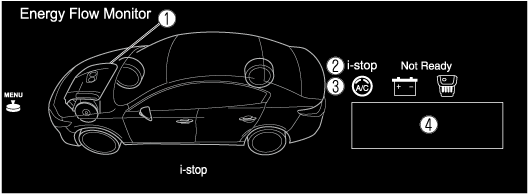
-
Displays the operation status of the i-stop function in the engine area. The engine area is illuminated while the engine idling stop is not operating, and it is not illuminated while the engine idling stop is operating.
-
Displays the readiness status as to whether operation of the i-stop function is available.
-
Displays the operation readiness status of the i-stop function using icons (engine, battery, and air conditioner). Icons which indicate that a system's operation readiness has been completed are illuminated. Icons which have not been illuminated indicate that the system's operation readiness has not been completed.
-
Indicates the operations required by the driver to operate the i-stop function while it is not operating.
-
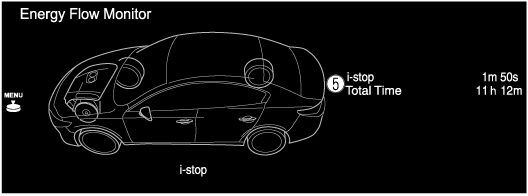
Displays the current amount of time that the i-stop function has been operating and the accumulated amount of time that it has been operating.
Only vehicles cylinder deactivation function
Displays the cylinder deactivation operation status.
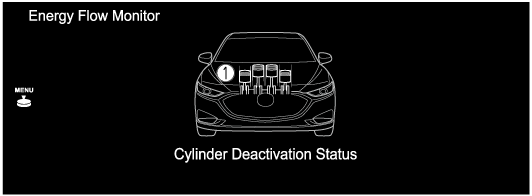
-
The condition of each cylinder is displayed by colors. The operating cylinders are displayed in red.
Fuel Efficiency (Some Models)
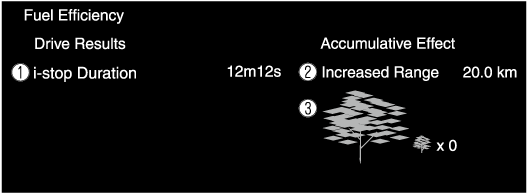
The actual performance of the energy efficiency is displayed.
-
i-stop Duration
Displays the amount of time that the i-stop function has operated.
-
Increased Range
Displays the total driving distance which could be extended by the operation of the i-stop function.
-
The leaf graphic grows according to the amount of CO2 emissions reduced by the system effects. The cumulative total amount of leaf growth is indicated in terms of the number of tree graphics.
Settings
Displays the fuel efficiency monitor settings screen.
The following settings can be changed in the settings screen.
-
Fuel efficiency history reset
-
Setting to reset or not reset the linked average fuel efficiency indicated in the instrument cluster and the fuel efficiency history (current) on the center display when tripmeter (TRIP A) is reset.
