Message Indicated on Multi-information Display
If there is a notification from the vehicle, a message is displayed on the multi-information display. Check the information and take the necessary action.
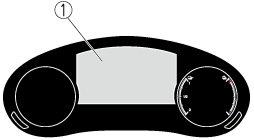
-
Multi-information display
If the warning light turns on/flashes simultaneously or a symbol is indicated on the display, check the information regarding the warning light or symbol.
Refer to If a Warning Light Turns On or Flashes (Search).
|
Display*1*2*3 |
Content |
Action to be taken |
|---|---|---|
|
Depress Brake Pedal. Brake Hold Disabled |
This message is indicated when there is a problem with the brake related system while the vehicle is being held in a stop position by the AUTOHOLD function. |
Depress the brake pedal. Cancel the AUTOHOLD function and have your vehicle inspected at an Authorized Mazda Dealer. |
|
Steep Slope. Continue Pressing Brake Pedal to Hold Stopped Position |
This message indicates the possibility of the vehicle not being held in the stopped position by the AUTOHOLD function, such as on steep slopes. |
Depress and hold your foot on the brake pedal. |
|
Depress Brake Pedal and Operate Switch to Release Elec. Parking Brake |
This message is indicated when the Electric Parking Brake (EPB) switch is operated without depressing the brake pedal. |
Operate the Electric Parking Brake (EPB) switch while depressing the brake pedal. |
|
Depress Brake Pedal and Operate Switch to Release |
This message is indicated when the cancel operation is done without depressing the brake pedal while the vehicle is being held in the stopped position by the AUTOHOLD function. |
Cancel the AUTOHOLD function stop hold control while depressing the brake pedal. |
|
Mazda Radar Cruise Control Canceled. Drive Safely |
This message is indicated when the Mazda Radar Cruise Control with Stop & Go function (MRCC with Stop & Go function) have been canceled other than by the driver. |
Have your vehicle inspected by an Authorized Mazda Dealer. |
|
Traffic Jam Assist Operation Canceled Drive Safely |
This message is indicated when the Traffic Jam Assist (TJA) have been canceled other than by the driver. |
Have your vehicle inspected by an Authorized Mazda Dealer. |
|
Distance & Speed Alert Operation Canceled Drive Safely |
This message is indicated when the Distance & Speed Alert (DSA) have been canceled other than by the driver. |
Have your vehicle inspected by an Authorized Mazda Dealer. |
|
Cruise Control Operation Canceled. Drive Safely |
This message is indicated when the Cruise Control have been canceled other than by the driver. |
Have your vehicle inspected by an Authorized Mazda Dealer. |
|
Emergency Braking Activated. Depress Brake Pedal to Hold Stop |
This message is indicated after the Smart Brake Support (SBS) brakes operate and when the SBS is canceled. |
Depress the brake pedal. |
|
Touch Key Fob to Push Button Start Switch |
This message is indicated when the key battery is weak (battery dead or damaged key). |
Touch the key against power switch to start the EV system. Refer to Starting the EV System When the Key Battery is Dead (Search). |
|
Depress Brake Pedal to Start Vehicle |
This message is displayed when the power switch is pressed without depressing the brake pedal. |
To start the EV system, press the power switch with the brake pedal depressed. |
|
Check Shift Selector Lever Position |
Displays in the following cases:
|
Check the selector lever position. |
|
Close Door and Fasten Seat Belt |
This message is indicated when the AUTOHOLD switch is pressed with the driver’s seat belt unfastened or the driver’s door open. |
Fasten the driver's seat belt and press the AUTOHOLD switch with the driver’s door closed. |
|
Wiper Blades Must Be on Windshield Before Operating |
This message is indicated when the power switch is switched ON with the wiper arms at the service positions. |
Return the wiper arms to the initial positions. |
|
Windshield Wiper Range of Motion Reduced. Remove Obstruction(s) |
This message is indicated when there is snow or dirt accumulation on the windshield and the wiper operation range is narrowed. |
Remove foreign matter from the windshield. |
|
Anti Roll Away Engaged. Move Gear Selector Lever into Park |
This message is indicated when the AUTO P (parking lock) function operates. |
Shift the selector lever to the P position. |
|
Move Gear Selector Lever into Park to Start Vehicle |
This message is indicated when the power switch is switched ON while the shift position is different from the selector lever position. |
Shift the selector lever to the P position. |
|
Vehicle Will Not Shift While Accelerator Pedal Is Depressed |
This message is indicated when the accelerator pedal is depressed with the selector lever in the N position. |
Release your foot from the accelerator pedal. |
|
Selector Position Ignored. Depress Brake Pedal for Shift Selection |
This message is indicated when the selector lever is shifted from the N position to the D or R position with the brake pedal not depressed. |
Depress the brake pedal. |
|
Vehicle in Neutral |
This message is displayed when in neutral hold mode (automatic car wash mode). |
The vehicle is in neutral hold mode (automatic car wash mode). If necessary, cancel neutral hold mode (automatic car wash mode). Refer to Selector Lever Operation (Search). |
|
Vehicle in Neutral. Move Gear Selector Lever into Neutral |
This message is indicated if the selector lever is shifted to the D or R position while neutral hold mode (automatic car wash mode) is operating. |
Shift the selector lever to the N position. |
|
Disconnect Charger to Start Vehicle |
This message is indicated when the EV system is started while the charge connector is connected. |
When starting the EV system, disconnect the charge connector. |
|
EV Charger Connected. Vehicle Cannot Be Driven |
This message is indicated when the charge connector is connected while the EV system is operating. |
When charging, switch the power switch OFF. |
|
Battery Heater Will Reduce High Voltage Battery Level Connect to EV Charger To Avoid High Voltage Battery Drain |
This message is indicated when the EV system is started after the battery heater has operated while the charge connector is not connected. |
Check the remaining distance-to-full discharge. Perform charging if necessary. |
|
Battery Heating Incomplete Due to High Voltage Battery Level Connect to EV Charger To Avoid High Voltage Battery Drain |
This message is displayed when the EV system is started after the battery heater stops automatically. |
If the battery heater operates while the vehicle is parked, connect the charge connector. |
|
Battery Heating Canceled Due to Five Days of Vehicle Inactivity Turn Battery Heater Off If Vehicle Will Not Be Driven |
This message is displayed when the EV system is started after the battery heater has operated for a long time and stopped automatically. |
If the vehicle is not used for long periods, set the battery heater to off. |
|
High Voltage Battery Charging Interrupted |
This message is displayed when the charging is interrupted. |
Check the connection status of the charge connector. |
|
Rising EV System Temp. Acceleration May Be Limited Avoid Moving at Very Low Speeds. Depress Brake When Not Moving |
This message is indicated when the vehicle is held in the stopped position with the accelerator pedal operated, such as on an upslope, and the motor reaches a high temperature. |
Depress the brake pedal. |
|
Regenerative Braking Temporarily Reduced |
This message is indicated when the regenerative braking is restricted. |
Drive the vehicle carefully because the regenerative braking force decreases. |
|
Shift Into Park Before Exiting Vehicle |
This message is indicated when the driver’s door is opened with the selector lever in a position other than the P position. |
Close the driver’s door or shift the selector lever to the P position. |
|
Battery Saving Mode. Drive Vehicle to Charge 12V Battery |
This message is indicated when the power consumption exceeds a certain amount such as by repeatedly opening/closing the doors or the liftgate when the power switch is switched OFF. Some of the functions are restricted to reduce power consumption. |
Drive the vehicle for 5 minutes or longer to charge the 12V battery. The warning message will clear just after starting the EV system. |
-
A pop-up is displayed when a warning occurs.
-
One screen displays four rows. If the entire message cannot be displayed on the screen, it switches to another screen.
-
The displayed content may differ from the actual vehicle.