Function of Each Power Switch Position
The power switch is switched in the order of OFF, ACC, and ON each time the power switch is pressed with the brake pedal not depressed. When pressing the power switch again from ON, it returns to OFF.
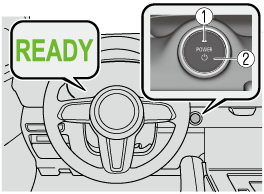
-
Indicator light
-
Power switch
|
Power switch |
Function |
|---|---|
|
OFF |
The power is switched OFF. The power switch indicator light (amber) turns off. |
|
ACC |
Some electrical accessories such as the audio can be used while the EV system is stopped (READY indication is not displayed). The power switch indicator light (amber) turns on. |
|
ON |
All electrical accessories can be operated while the EV system is stopped (READY indication is not displayed). The power switch indicator light (amber) turns on. (The power switch indicator light turns off while the EV system is operating (READY indication is displayed). |
-
The READY indication is displayed in the instrument cluster when the EV system is activated. The READY indication remains displayed while the EV system is operating.
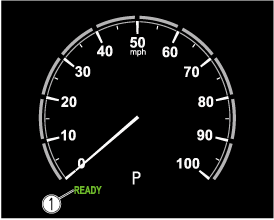
-
READY indication
-
-
If the power switch is left in the ACC position, the power switch switches OFF after about 25 minutes.
-
The EV system starts by pressing the power switch with the brake pedal completely depressed. To switch the power switch position, press the power switch without depressing the pedal.
-
The power switch is not switched OFF when the power switch indicator light turns off while the EV system is stopping. Before leaving the vehicle, always switch the power switch OFF (power switch indicator light off).