Setting the System
Operation switch
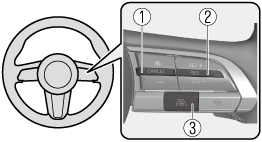
-
CANCEL switch
-
RES switch
-
TJA switch
Operation conditions
Headway control function
The headway control operates when all of the following conditions are met.
-
The TJA is on.
-
The selector lever is in the D position.
-
The parking brake is released.
-
All the doors are closed.
-
The driver's seat belt is fastened.
-
Vehicle speed is 0 to 140 km/h (0 to 87 mph)
Steering assist function
The steering assist function operates when all of the following conditions are met.
-
The headway control function is operating.
-
The vehicle is being driven at a speed of less than about 56 km/h (35 mph).
-
When driving near the center of the lane and the white (yellow) lane lines on both sides are detected clearly, or a vehicle ahead is detected clearly in front of your vehicle.
-
The steering wheel is not turned sharply.
-
The turn signal lever is not operated.
-
The steering operation assist is performed so that the vehicle remains near the center of the driving lane, however, depending on conditions such as the road curvature, road slope and undulations, and vehicle speed, the function might not be able to keep the vehicle near the center of the driving lane.
-
Under the following conditions, the TJA cannot be used when the vehicle speed is 30 km/h (20 mph) or slower.
-
The Forward Sensing Camera (FSC) cannot detect target objects.
-
There is a problem with the Electric Parking Brake (EPB).
-
There is a problem with the stop hold control function.
-


Setting the vehicle speed
-
Press the TJA switch to turn the system on.
-
Accelerate the vehicle until it reaches the desired speed using the accelerator pedal and press the RES switch up (SET+) or down (SET-) to set the speed.
-
When the system is turned on, the TJA standby indication (white) turns on and the TJA display indication is displayed on the multi-information display and the active driving display.
-
When the vehicle speed is set, the set vehicle speed is displayed on the displays and the TJA standby indication (white) changes to the TJA set indication (green)
-
The minimum speed setting is 30 km/h (19 mph).
-
When the TJA switch is pressed while the Mazda Radar Cruise Control with Stop & Go function (MRCC with Stop & Go function) system is operating, the MRCC with Stop & Go function switches to the TJA. In addition, when the MRCC switch is pressed while the TJA is operating, the TJA switches to the MRCC with Stop & Go function.
Setting the distance between vehicles
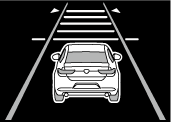
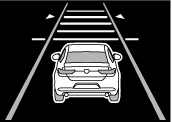
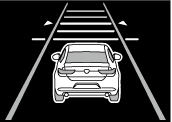
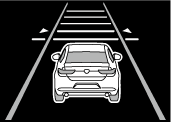
The distance between vehicles is set to a shorter distance by pressing the CANCEL switch down, and to a longer distance by pressing the CANCEL switch up. The distance between vehicles can be set to 4 levels: Long, medium, short, and extremely short distance.
The distance between vehicles increases or decreases depending on the vehicle speed.
|
Distance-between-vehicles guideline (at 80 km/h (50 mph) vehicle speed) |
Indication on display |
|
|---|---|---|
|
Indication on multi-information display |
Indication on active driving display*1 |
|
|
Long (about 50 m (164 ft)) |
 |
 |
|
Medium (about 40 m (131 ft)) |
 |
 |
|
Short (about 30 m (98 ft)) |
 |
 |
|
Extremely short (about 25 m (82 ft)) |
 |
 |
-
Displays a pop-up image when the CANCEL switch is operated.
Changing the set vehicle speed
How to change the set vehicle speed using the RES switch
When the RES switch is pressed up (SET+), the vehicle accelerates, and when the RES switch is pressed down (SET-), the vehicle decelerates.
-
Press and release immediately: 1 km/h (1 mph)
-
Press and hold: 10 km/h (5 mph)
How to change the set vehicle speed using the accelerator pedal
Depress the accelerator pedal until the vehicle speed reaches the desired speed, then press the RES switch up (SET+) or down (SET-) and release the switch.
Temporary cancellation
Headway control function
If any of the following conditions is met, the headway control function is temporarily canceled.
-
The headway control function operation conditions are not met.
-
The CANCEL switch is pressed.
-
The brake pedal is depressed.
-
The front radar sensors cannot detect target objects.
-
The DSC has operated.
-
The Smart Brake Support (SBS) has operated.
-
The frequency of the braking operation by the TJA is high.
-
There is a problem in the system.
Steering assist function
If any of the following conditions is met, the steering assist function is temporarily canceled.
-
The headway control function is canceled.
-
White (yellow) lane lines cannot be detected or a vehicle ahead cannot be recognized.
-
The vehicle speed is about 64 km/h (40 mph) or faster.
-
The Lane-keep Assist System (LAS) has operated.
-
The Blind Spot Assist has operated.
-
The Road Keep Assist has operated.
-
The Forward Sensing Camera (FSC) cannot be used.
-
The accelerator pedal is depressed.
-
The turn signal lever is operated.
-
The steering wheel is operated abruptly
-
The driver takes his/her hands off the steering wheel.
-
The vehicle is making a sharp curve.
-
The vehicle crosses a lane line.
-
The width of the vehicle lane is narrow or wide.
-
There is a problem in the system.
-
If you are not holding the steering wheel properly, the warning sound is activated and warnings are displayed on the multi-information display and the active driving display.
Multi-information display
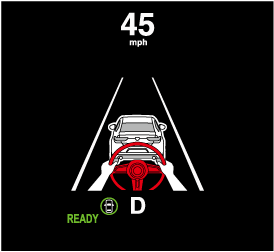
Active driving display

Resuming the control
If the TJA is temporarily canceled, it will resume operation at the previously set speed by pressing the RES switch after all of the operation conditions have been met again.
Turning off the system
When the TJA switch is pressed while the TJA is operating, the TJA turns off.