Checking Charging Status
Charge indicator
The illumination/flash pattern of the charge indicator can be checked using the labels on the charge lid.
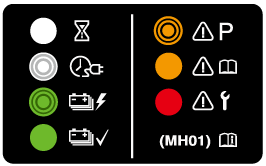
|
Charge indicator illumination/flash pattern |
Content |
|
|---|---|---|
|
— |
OFF |
Charging is possible. |
 (White) |
ON |
Turns on when waiting for starting to charge. |
 (White) |
Flashes slowly |
The brightness changes when the charging timer is set. |
 (Green) |
Flashes slowly |
The brightness changes during charging. |
 (Green) |
ON |
Turns on when charging is completed. Turns off after a certain period of time has passed since charging was completed. |
 (Amber) |
Flashes |
Flashes when the charging connector is connected and the selector lever is in a position other than P. Shift the selector lever to the P position. |
 (Amber) |
ON |
Turns on if there is a problem with the charging system when the charging connector is connected. Wait a few minutes then reconnect the charging connector. |
 (Red) |
ON |
Turns on if there is a problem with the charging system and the charging port lid is opened or the charging connector is connected. Have your vehicle inspected by an Authorized Mazda Dealer. |
Multi-information Display
When the driver's door is opened with the charge connector connected, the charging status is displayed on the multi-information display.
(Power switch OFF)

-
Message
-
High voltage battery indication
-
Maximum driving distance
-
Charging completion time
-
Remaining charge
(Power switch ON)
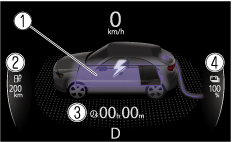
-
High voltage battery indication
-
Maximum driving distance
-
Charging completion time
-
Remaining charge
|
Indication |
Content |
|
|---|---|---|
|
— |
Preparing to Charge |
Displays while the charging timer is being canceled and when the charging connector is connected. |
|
— |
Charging Scheduled |
Displays while in charging timer mode and when the charging connector is connected. |
 |
Charging |
Displays during charging. |
 |
Charging Complete |
Displays when charging is completed. |
 |
Charging Error. Shift Selector Lever Not in Park |
Displays when charging is started with the selector lever in a position other than P. |
|
Charging Interrupted. See Owner's Manual for Details |
Displays when charging is interrupted. |
|
|
Charging Error. Have the Vehicle Inspected |
Displays when charging is not possible due to a charging system problem. |
|
When charging is started, the charging status screen is displayed for a while. The charging status screen turns off after a certain period of time passes or the doors or liftgate is locked.
The screen is displayed again when the doors or liftgate is unlocked.