Driving Position Memory (Power Seat)
The desired driving position can be called up after programming the position.
The following driving positions can be programmed.
-
Driver’s seat position (seat slide, height adjustment, front edge of seat bottom, seat recline)
Refer to Adjusting the Driver's Seat (Search).
-
Active driving display (display position, brightness level, display information)
Refer to Active Driving Display (Search).
-
Outside mirror angle
Refer to Outside Mirrors (Search).
A driving position can be programmed to the following parts.
-
Position memory switch
-
Transmitter used for vehicle


Programming
-
Make sure the parking brake is on.
-
Make sure the selector lever is in the P position.
-
Switch the power switch ON.
-
Adjust the following parts to the desired conditions.
-
Driver's seat
-
Active driving display
-
Outside mirrors
-
-
Press the SET switch continuously until a sound is activated.
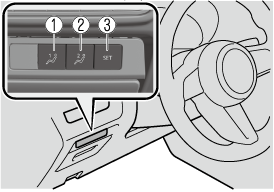
-
1 switch
-
2 switch
-
SET switch
-
-
Do the following operation within 5 seconds after the sound is activated to program the driving position.
-
Programming to a position memory switch
Press the switch you want to program, either 1 or 2 switch.
-
Programming to the transmitter
Press the unlock switch on the transmitter.
A sound is activated when the operation is completed correctly.
-
-
If you do not perform the operation correctly, a sound indicating that the programming has failed is activated.
-
If the angle of the outer mirrors only changes a little, the angle of the outer mirrors may not have been programmed correctly.
-
If the angle of the outer mirrors is adjusted close to the limits of its range of motion, the driving position can be successfully programmed, but it may fail when calling up the programmed driving position.
Calling up the programmed driving position
Do not place fingers or hands around the bottom of the seat while the seat memory function is operating. The seat moves automatically while the seat memory function is operating and fingers or hands could get pinched and injured.
-
When adjustment of the driving position is not necessary, a sound is not activated.
-
The driving position adjustment is canceled in the following cases:
-
The seat adjustment switch on the driver's seat is operated.
-
The angle of the outer mirrors is adjusted.
-
The SET switch is pressed.
-
Programming switch 1 or 2 is pressed.
-
The lock switch or unlock switch on the transmitter is pressed.
-
The vehicle starts moving.
-
The active driving display is adjusted.
-
The selector lever is shifted to a position other than P.
-
The walk in switch is operated.
-
Using the position memory switch
-
Press the programming switch for the driving position you want to call up (switch 1 or 2).
-
A sound is activated when the adjustment to the programmed driving position is completed.
Using the transmitter
-
Unlock the driver's door using one of the following methods.
-
Touch the sensing area of the door release touch sensor.
-
Press the unlock switch on the transmitter.
-
-
When you open the driver's door within 90 seconds after unlocking the doors, the adjustment of the following parts starts.
-
Driver's seat
-
Active driving display (When the power switch is switched ON, the adjusted active driving display is activated.)
-
Outside mirrors
A sound is activated when the adjustment is completed.
-
Erasing programmed driving positions
Erasing the driving positions programmed to the key
-
Switch the power switch OFF.
-
Press the SET switch continuously until a sound is activated.
-
Press the lock switch on the transmitter within 5 seconds after the sound is activated.
If you do not perform the operation correctly, a sound indicating that the programming has failed is activated.