DSC OFF Switch
Press the DSC OFF switch to turn off the TCS/DSC. The DSC OFF indicator light in the instrument cluster will illuminate.
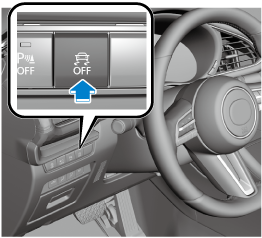
Press the switch again to turn the TCS/DSC back on. The DSC OFF indicator light will turn off.
-
When the TCS/DSC is on and you attempt to free the vehicle from being stuck, the TCS/DSC will activate. Depressing the accelerator will not increase engine power and freeing the vehicle from being stuck might be difficult. When this happens, turn off the TCS/DSC.
-
If the TCS/DSC is off when the engine is turned off, it automatically activates when the ignition is switched ON.
-
Leaving the TCS/DSC on will provide the best traction.
-
If the DSC OFF switch is pressed and held for 10 seconds or more, the DSC OFF switch malfunction detection function operates and the TCS/DSC system activates automatically. The DSC OFF indicator light turns off while the TCS/DSC system is operative.
-
(Vehicles with Smart Brake Support (SBS))
If the Smart Brake Support (SBS) operates with the TCS/DSC turned off, the TCS/DSC becomes operational automatically.