

High Voltage Battery Monitor (Some Models)
Display the High Voltage Battery Monitor screen.
-
Select “Information” on the home screen.
-
Select “High Voltage Battery Monitor”.
-
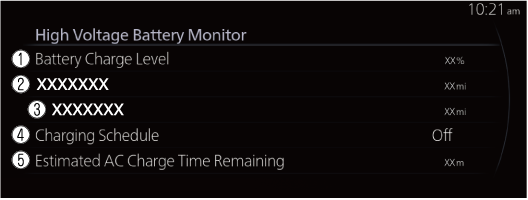
Battery Charge Level
The remaining amount of power in the drive battery is indicated.
-
Driving Range (Some Models)
The remaining distance-to-full discharge is indicated.
Total Range (Some Models)
Maximum driving distance display for fuel and high voltage battery is indicated.
-
Driving Range without Climate Control (Some Models)
The remaining distance-to-full discharge with the climate control system off is indicated.
EV Range (Some Models)
Maximum driving distance display for high voltage battery is indicated.
-
Charging Schedule
The next scheduled charging date is indicated.
-
Estimated AC Charge Time Remaining
The estimated time until normal charging is completed is indicated.
