Vehicle Equipment
Setting change method
-
Select
 on the home screen and display the setting screen.
 -
Switch the tab to [Vehicle] and select the setting item you want to change.
|
Function and how it can be changed |
||||
|---|---|---|---|---|
|
Illuminated entry system |
Time until interior lights turn off after closing door |
60 seconds/30 seconds/15 seconds/7.5 seconds |
||
|
Time until interior lights turn off automatically when any door is not closed completely |
60 minutes/30 minutes/10 minutes |
|||
|
Rain Sensing Wiper |
Auto-wiper control |
|||
|
Operational/non-operational |
On/Off*1 |
|||
|
Lighting |
Auto headlight off*2 |
|||
|
Time until headlights turn off |
120 seconds/90 seconds/60 seconds/30 seconds/Off*3 |
|||
|
Auto-light control |
||||
|
Timing by which lights turn on |
Low/Med. Low/Medium/Med. High/High |
|||
|
High Beam Control System (HBC) |
||||
|
Operational/non-operational*4 |
On/Off |
|||
|
Adaptive Front Lighting System (AFS) |
||||
|
Operational/non-operational*4 |
On/Off |
|||
|
Lights-on reminder*5 |
||||
|
Warning beep volume |
High/Low/Off |
|||
|
Coming home light |
||||
|
Time until headlights turn off |
120 seconds/90 seconds/60 seconds/30 seconds/Off |
|||
|
Leaving home light |
||||
|
Operational/non-operational |
On/Off |
|||
|
Ambient lights |
||||
|
Ambient lights brightness*6 |
Bright/Medium/Dim/Off |
|||
|
Turn signals |
Turn signal indicator |
|||
|
Beep volume |
High/Low |
|||
|
Three-flash turn signal |
||||
|
Operational/non-operational |
On/Off |
|||
-
If the auto-wiper control is set to Off, the wiper lever
 position is set to intermittent operation.
 -
If the setting is changed to Off, the following operation is performed according to the headlight switch position:
-
At
position: Headlights turn off immediately after the ignition is switched off. -
At any position other than
: Headlights on/off conditions vary according to the headlight switch position.
-
-
When set to Off, the lights-on reminder is operable.
-
Though these systems can be turned Off, doing so will defeat the purpose of the system and Mazda recommends that these systems remain On.
-
The lights-on reminder settings can be changed at anytime, however, the lights-on reminder only operates when the auto headlight function is set to Off.
-
Change the ambient light illumination level with the parking lights or headlights turned on.
Door locks
Method for changing the auto lock/unlock functions using the door-lock switch
-
Function number 3 in the following table is the factory setting for your vehicle.
-
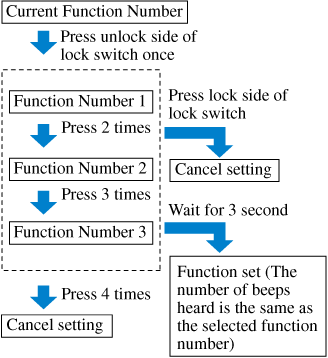
There are only a total of six auto lock/unlock settings available for automatic transaxle vehicles, and three for manual transaxle vehicles. Be sure to press the unlock side of the door-lock switch the correct number of times according to the selected function number. If the switch is mistakenly pressed seven times on an automatic transaxle vehicle or four times on a manual transaxle, the procedure will be cancelled. If this occurs, start the procedure from the beginning.


|
Function number |
Function*1 |
|---|---|
|
1 |
The auto door-lock function is disabled. |
|
2 |
All the doors lock automatically when the vehicle speed is about 20 km/h (12 mph) or more. |
|
3 (Factory Setting) |
All the doors lock automatically when the vehicle speed is about 20 km/h (12 mph) or more. All the doors unlock when the ignition is switched from ON to Off. |
|
4 |
(Automatic transaxle vehicles only) When the ignition is switched ON and the selector lever is shifted from park (P) to any other gear position, all the doors lock automatically. |
|
5 |
(Automatic transaxle vehicles only) When the ignition is switched ON and the selector lever is shifted from park (P) to any other gear position, all the doors lock automatically. When the selector lever is shifted to park (P) while the ignition is switched ON, all the doors unlock automatically. |
|
6 |
(Automatic transaxle vehicles only) All the doors lock automatically when the vehicle speed is about 20 km/h (12 mph) or more. When the selector lever is shifted to park (P) while the ignition is switched ON, all the doors unlock automatically. |
-
Other settings for the auto door lock function are available at an Authorized Mazda Dealer. For details consult an Authorized Mazda Dealer
-
Safely park the vehicle. All doors must remain closed.
-
Switch the ignition ON.
-
Press and hold the lock side of the driver's door-lock switch within 20 seconds of switching the ignition ON, and make sure a beep sound is heard about eight seconds afterwards.
-
Refer to the auto lock/unlock function setting table, determine the function number for the desired setting. Press the unlock side of the driver's door-lock switch the same number of times as the selected function number (Ex. If you select function 2, press the unlock side of the switch only 2 times).
-
Three seconds after the function setting has been changed, a beep sound will beep in the amount of the selected function number. (Ex. Function number 3 = 3 beep sounds)
(Manual transaxle vehicles)
(Automatic transaxle vehicles)

Method for changing functions using the center display
-
Select
on the home screen and display the setting screen. -
Switch the tab to [Vehicle] and select the setting item you want to change.
|
Function and how it can be changed |
|||
|---|---|---|---|
|
Door locks |
|||
|
Operation condition of auto lock/unlock function |
Lock: Out of Park Unlock: In Park/ Lock: Shifting Out of Park/ Lock: When Driving Unlock: In Park/ Lock: When Driving Unlock: IGN Off/ Lock: When Driving/ Off |
||
|
Hands-Free Liftgate |
ON/OFF |
||
Keyless entry system
Method for changing the unlock functions using the key
-
Switch the ignition off and close all of the doors and the trunk lid.
-
Open the driver's door.
-
Within 30 seconds of opening the driver's door, press and hold the UNLOCK button on the key for 5 seconds or longer (the sound of the doors locking/unlocking can be heard). After this, the system switches the setting of pressing the driver's request switch once or twice to unlock all doors each time the UNLOCK button is pressed (the sound of the doors locking/unlocking can be heard).
-
The setting change is completed by doing any one of the following:
-
Switching the ignition to ACC or ON.
-
Closing the driver's door.
-
Opening the trunk lid.
-
Not operating the key for ten seconds.
-
Pressing any button except the UNLOCK button on the key.
-
Pressing a request switch.
-
Method for changing functions using the center display
-
Select
on the home screen and display the setting screen. -
Switch the tab to [Vehicle] and select the setting item you want to change.
|
Function and how it can be changed |
|||
|---|---|---|---|
|
Keyless entry system |
|||
|
Method for unlocking door using transmitter |
All Doors: Once/Driver's: Once, All Doors: Twice |
||
|
Time for locking door automatically |
90 seconds/60 seconds/30 seconds |
||
Advanced keyless entry system
Method for changing the unlock functions using the key
-
Switch the ignition off and close all of the doors and the trunk lid.
-
Open the driver's door.
-
Within 30 seconds of opening the driver's door, press and hold the UNLOCK button on the key for 5 seconds or longer (the sound of the doors locking/unlocking can be heard).
After this, the system switches the setting of pressing the driver's request switch once or twice to unlock all doors each time the UNLOCK button is pressed (the sound of the doors locking/unlocking can be heard).
-
The setting change is completed by doing any one of the following:
-
Switching the ignition to ACC or ON.
-
Closing the driver's door.
-
Opening the trunk lid.
-
Not operating the key for ten seconds.
-
Pressing any button except the UNLOCK button on the key.
-
Pressing a request switch.
-
How to change the volume of the door lock/unlock beep sound
-
Switch the ignition off and close all of the doors and the trunk lid.
-
Open the driver's door.
-
Within 30 seconds of opening the driver's door, press and hold the LOCK button on the key for 5 seconds or longer. (All of the doors and the liftgate are locked and unlocked when the LOCK button on the key is pressed and held for 5 seconds.)
The beep sound activates at the currently set volume. The setting changes each time the LOCK button on the key is pressed and the beep sound activates at the set volume. (If the beep sound has been set to not activate, it will not activate.)
-
The setting change is completed by doing any one of the following:
-
Switching the ignition to ACC or ON.
-
Closing the driver's door.
-
Opening the trunk lid.
-
Not operating the key for ten seconds.
-
Pressing any button except the LOCK button on the key.
-
Pressing a request switch.
-
Method for changing functions using the center display
-
Select
on the home screen and display the setting screen. -
Switch the tab to [Vehicle] and select the setting item you want to change.
|
Function and how it can be changed |
|||
|---|---|---|---|
|
Advanced keyless entry system |
|||
|
Method for unlocking door using transmitter |
All Doors: Once/Driver's: Once, All Doors: Twice |
||
|
Time for locking door automatically |
90 seconds/60 seconds/30 seconds |
||
|
Walk-away auto lock function operation/non-operational |
ON/OFF |
||
|
Beep volume when locking/unlocking |
High/Medium/Low/Off |
||