AUX
How to connect Auxiliary jack
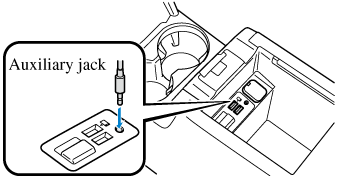
Connecting with a connector cable
-
Open the console lid.
-
If there is a cover on the auxiliary jack, remove the cover.
-
Connect the device plug/connector cable to the auxiliary jack. For vehicles with a DVD/CD player, pass the device plug/connector cable through the notch in the console and connect.
Do not allow the connection plug cord to get tangled with the parking brake (without electric parking brake (EPB)) or the shift lever (manual transaxle)/selector lever (automatic transaxle):
Allowing the plug cord to become tangled with the parking brake (without electric parking brake (EPB)) or the shift lever (manual transaxle)/selector lever (automatic transaxle) is dangerous as it could interfere with driving, resulting in an accident.


Do not place objects or apply force to the auxiliary jack with the plug connected.
-
Insert the plug into the auxiliary jack securely.
-
Insert or pull out the plug with the plug perpendicular to the auxiliary jack port hole.
-
Insert or remove the plug by holding its base.
How to use AUX mode
-
Select the
 icon on the home screen to display the Entertainment screen.
 -
Select
 to switch to the AUX mode. The following icons are displayed in the lower part of the center display.
|
Icon |
Function |
|---|---|
 |
Displays the Entertainment menu. Use to switch to a different audio source. |
 |
Displays sound settings to adjust audio quality level. Refer to Other Equipment/Functions (Search). |
-
If a device is not connected to the auxiliary jack, the mode does not switch to the AUX mode.
-
Adjust the audio volume using the portable audio device, commander switch, or audio control switch.
-
Audio adjustments can also be made using the portable audio device's volume setting.
-
If the connection plug is pulled out from the auxiliary jack while in AUX mode, noise may occur.