Bluetooth® Hands-Free
Introduction
When a Bluetooth® device (mobile phone) is connected to the vehicle's Bluetooth® unit via radio wave transmission, a call can be made or received by pressing the talk button, pick-up button, or hang-up button on the audio remote control switch, or by operating the center display.
-
For your safety, a device can be paired only when the vehicle is parked. If the vehicle starts to move, the pairing procedure will end. Park the vehicle in a safe place before pairing.
-
The communication range of a Bluetooth® equipped device is about 10 meters (32 ft) or less.
-
Basic audio operation is available using voice commands even if Bluetooth® is not connected.
-
For safety reasons, operation of the center display is disabled while the vehicle is being driven. However, items not displayed in gray can be operated using the commander switch while the vehicle is being driven.
-
Some Bluetooth® mobile devices are not compatible with the vehicle. Consult an Authorized Mazda Dealer, Mazda's call center or Web support center for information regarding Bluetooth® mobile device compatibility:


-
U.S.A.
Phone: 800-430-0153
-
Canada
Phone: 800-430-0153
-
Mexico
Center of Attention to Client (CAC)
Phone: 01-800-01-MAZDA
-
Germany
Phone: 0800 4263 738 (8:00―18:00 Central European Time)
-
Europe (Except Germany)
Phone: 00800 4263 7383 (8:00―18:00 Central European Time)
-
Worldwide
 49 721 5099 8198 (8:00―18:00 Central European Time)
Web:
-
Australia
Phone: 1800-352-703 during business hours (10am―4pm Eastern Standard Time)
Web: www.mazda.com.au
-
New Zealand
Applicable Bluetooth® specification (Recommended)
Ver. 1.1/1.2/2.0 EDR/2.1 EDR/3.0 (conformity)
Component Parts
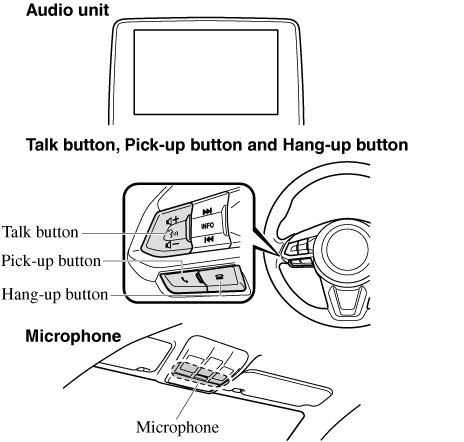
Microphone (hands-free)
The microphone is used for speaking voice commands or when making a Hands-free call.
Talk button
Activates the voice recognition. In addition, it skips the voice guidance.
Pick-up button
Answers incoming calls. In addition, after selecting a contact or dialing a number, it places the call when the button is pressed.
Hang-up button
Ends the call or refuses an incoming call. In addition, it ends the voice recognition operation.
Commander switch
The commander switch is used for volume adjustment and display operation. Tilt or turn the commander knob to move the cursor. Press the commander knob to select the icon.
Volume adjustment
The volume dial of the commander switch is used to adjust the volume. Turn the dial to the right to increase volume or to the left to decrease it.
The volume can also be adjusted using the volume button on the steering wheel.
-
Press the volume dial to switch the audio MUTE on and off.
-
If the volume is lower compared to other audio modes, increase the volume from the device side.
Conversation volume and the volume of the voice guidance and ringtone can each be set in advance.
-
Select the
 icon on the home screen to display the Communication screen.
 -
Select
 .
. -
Adjust the
 and the
  using the slider.